
To create Pie charts using JFreeChart API you need to include following API jars to you project.
1. jcommon-1.0.16.jar
2. jfreechart-1.0.13.jar
Create a project structure as shown below,
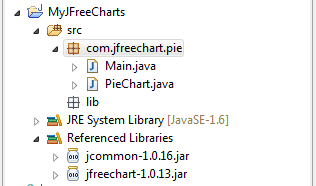
Create a PieChart.java class having pie chart implementation. As shown below,
PieChart.java
Main.java
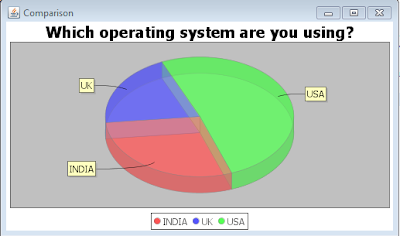
Run the Main class as a JAVA application, you will get a output as JFrame showing the piecharts.
Output:
1. jcommon-1.0.16.jar
2. jfreechart-1.0.13.jar
Create a project structure as shown below,
Create a PieChart.java class having pie chart implementation. As shown below,
PieChart.java
package com.jfreechart.amolfasale;
import javax.swing.JFrame;
import org.jfree.chart.ChartFactory;
import org.jfree.chart.ChartPanel;
import org.jfree.chart.JFreeChart;
import org.jfree.chart.plot.PiePlot3D;
import org.jfree.data.general.DefaultPieDataset;
import org.jfree.data.general.PieDataset;
import org.jfree.util.Rotation;

@SuppressWarnings("serial")

public class PieChart extends JFrame {
    public PieChart(String applicationTitle, String chartTitle) {
        super(applicationTitle);
        // This will create the dataset
        PieDataset dataset = createDataset();

        // based on the dataset we create the chart
        JFreeChart chart = createChart(dataset, chartTitle);

        // we put the chart into a panel
        ChartPanel chartPanel = new ChartPanel(chart);

        // default size
        chartPanel.setPreferredSize(new java.awt.Dimension(500, 270));

        // add it to our application
        setContentPane(chartPanel);
    }

    //Here is the dataset creation which is used for the information which we want to show in piechart.
    private  PieDataset createDataset() {

        DefaultPieDataset result = new DefaultPieDataset();

        result.setValue("INDIA", 29);

        result.setValue("UK", 20);

        result.setValue("USA", 51);

        return result;
    }

    private JFreeChart createChart(PieDataset dataset, String title) {

        //Here we are creating the 3D pie chart with dataset(created above) and with legend.
        JFreeChart chart = ChartFactory.createPieChart3D(title,  // chart title
                dataset,                // data
                true,                   // include legend
                true,
                false);

        PiePlot3D plot = (PiePlot3D) chart.getPlot();
        plot.setStartAngle(290);
        plot.setDirection(Rotation.CLOCKWISE);
        plot.setForegroundAlpha(0.5f);
        return chart;
    }
}
Then create Main class which have the call to createing piechart method. As shown below, Main.java
package com.jfreechart.amolfasale;
public class Main {
public static void main(String[] args) {
    PieChart demo = new PieChart("Comparison", "Which operating system are you using?");
    demo.pack();
    demo.setVisible(true);
    }
}
Run the Main class as a JAVA application, you will get a output as JFrame showing the piecharts.
Output:

