Tuesday, March 5, 2013

Hadoop : Hive In Action

Hive: A Simple Introduction

Hive is built on Hadoop and uses Hadoop’s storage(HDFS) and execution(MapReduce) modules. In terms of storage Hive can use any file system supported by Hadoop, although HDFS is by far the most common. If you’re not going to be using HDFS you probably want a more in-depth introduction than what I’m going to give here. Hive Queries are translated to a graph of Hadoop MapReduce jobs that get executed on your Hadoop grid. As you can see Pig and Hive use the same methods of execution abstraction. The big difference comes in the language used to access the data.
Figure 1 : Hive Structure diagram.

Hive Query Language (HQL) is based on SQL, and you’ll find many of the familiar constructs such as SHOW, DESCRIBE, SELECT, USE and JOIN. You can find the full definition of the language here: Hive Lanuage Manual. Similar to an RDBMS in Hive you will find Databases that contain one or more Tables that contain some Data defined by a Schema.
Hive also supports User Defined Functions (UDFs) and Serialization/Deserialization functions (SerDe’s). UDFs allow programmers to write functions to abstract common tasks in Hive. It also allows you to seamlessly connect a Query Language in Hive with functional, procedural or scripting languages. SerDe’s allow for the management of arbitrarily structured or unstructured data in Hive. One particularly useful and popular SerDe is the now built-in one for Avro.
Hive uses a metadata store to keep the data warehouse information that links Hive and the raw data. Data loaded into Hive can be maintained in an external location or a copy made into the Hive warehouse. In this way you can create a self-contained data warehouse, or share the infrastructure with MapReduce and Pig programmer.
Out of the box Hive uses a Derby database for the metadata store. For scalability and performance you’ll want to switch to use an RDBMS such as MySQL as your Hive system matures.

Getting Started

The first thing you’ll need to do is install and get Hive up and running. The Getting Started Guide is your best resource for this.
Once Hive is installed you’ll want to create and use a database:

1.      Create Database

hive> CREATE DATABASE demo;
hive> use demo;
Next create a table with a schema:

2.      Create Table

hive> CREATE TABLE demoTable (foo INT, bar STRING);
hive> describe demoTable;
Now let’s load some data from HDFS into Hive. Assuming there’s an input file where each row has an integer and a string:

3.      Load data to table

hive> LOAD DATA LOCAL INPATH ‘./resources/input.txt’ OWERWRITE INTO TABLE demoTable;

4.      get data from table

hive> SELECT * FROM demoTable;

5.      Create Table : reference  an external data-store

Note that when data is LOAD’ed like we do above the data is copied and moved into Hive’s warehouse. This is all well and good if you want your Hive queries to be self-contained and not affect the rest of the Hadoop analysts who are using MapReduce and/or Pig. Dropping the table from Hive will not affect the original data.
I find one of the most powerful features of the Hadoop eco-system is allowing programmers to access the same data using different interfaces. If you want Hive to simply reference an external datastore you can create your tables in the following way:

hive> CREATE EXTERNAL TABLE demoTable (foo INT, bar STRING) ROW FORMAT STORED AS TEXTFILE LOCATION ‘./resource/input.txt’;

This links your external file to the Hive meta-store. Manipulations on the data in Hive will be reflected in the shared data, and changes in the data will be reflected in Hive. If you drop the table only the Hive meta-store is affected.

Pretty quickly you’ll get into the situation where you want to define the structure of the data and maintain that schema separately. This is where Avro comes in. Let’s load some data using Avro instead of the default SequenceFile:

Create an Avro schema and save it to the file system (the namespace and name are not important):
{
“namespace”: “org.demo.schema”,
“name”: “demo_schema”,
“type”: “record”,
“fields”: [
   { "name": "foo", "type": "int" },
   { "name": "bar", "type": "string" }
] }
hive> CREATE TABLE demoTableAvro PARTITIONED BY (ds string)
ROW FORMAT SERDE ‘org.apache.hadoop.hive.serde2.avro.AvroSerDe’
WITH TBLPROPERTIES(‘avro.schema.url’='file:///path/to/schema/demoSchema.avsc’ STORED AS
INPUTFORMAT ‘org.apache.hadoop.hive.ql.io.avro.AvroContainerInputFormat’
OUTPUTFORMAT ‘org.apache.hadoop.hive.ql.io.avro.AvroContainerOutputFormat’;

Using any of these three approaches you can create tables and load data into it. Now programmers can write queries against this data warehouse similar to their existing workflow and experience.

Conclusion

Hive is a great way to share your Hadoop infrastructure with programmers who are the most comfortable with Query Languages. By combining MapReduce, Pig and Hive you can create a full-featured data warehouse and analytics system. Next up you’ll want to look at workflow automation tools and ways to store and serve your results. Look for this in upcoming posts.

Introduction to MapReduce : Hadoop Programming Component

MapReduce: A Simple Introduction


MapReduce is a framework for processing parallel problems across the cluster (Cluster is the large network of synchronized nodes connected together) or a grid (if the nodes are shared across geographically and administratively distributed systems, and use more heterogeneous hardware). Computational processing can occur on data stored either in a file system (unstructured) for example HDFS (Hadoop Distributed File System) or in a database (structured) for example any RDBMS. MapReduce can take advantage of locality of data, processing data on or near the storage assets to decrease transmission of data.
Figure 1 : MapReduce Flow Structure.

MapReduce: Logical view

The Map and Reduce functions of MapReduce are both defined with respect to data structured in (key, value) pairs. Map takes one pair of data with a type in one data domain, and returns a list of pairs in a different domain:
Map (k1,v1) → list(k2,v2)
The Map function is applied in parallel to every pair in the input dataset. This produces a list of pairs for each call. After that, the MapReduce framework collects all pairs with the same key from all lists and groups them together, creating one group for each key.
The Reduce function is then applied in parallel to each group, which in turn produces a collection of values in the same domain:
Reduce(k2, list (v2)) → list(v3)

                          As an example of the utility of map: Suppose you had a function toUpper(str) which returns an uppercase version of its input string. You could use this function with map to turn a list of strings into a list of uppercase strings. Note that we are not modifying the input string here: we are returning a new string that will form part of a new output list.
Each Reduce call typically produces either one value v3 or an empty return, though one call is allowed to return more than one value. The returns of all calls are collected as the desired result list. Thus the MapReduce framework transforms a list of (key, value) pairs into a list of values. This behaviour is different from the typical functional programming map and reduces combination, which accepts a list of arbitrary values and returns one single value that combines all the values returned by map.


Figure 3: MapReduce Key-Value pair example.

Dataflow

The frozen part of the MapReduce framework is a large distributed sort. The hot spots, which the application defines, are:
  1. an input reader
  2. a Map function
  3. a partition function
  4. a compare function
  5. a Reduce function
  6. an output writer

1.      Input reader

The input reader divides the input into appropriate size 'splits' (in practice typically 16 MB to 128 MB) and the framework assigns one split to each Map function. The input reader reads data from stable storage (typically a distributed file system) and generates key/value pairs.
A common example will read a directory full of text files and return each line as a record.

2.      Map function

The Map function takes a series of key/value pairs, processes each, and generates zero or more output key/value pairs. The input and output types of the map can be (and often are) different from each other.
If the application is doing a word count, the map function would break the line into words and output a key/value pair for each word. Each output pair would contain the word as the key and the number of instances of that word in the line as the value.

3.      Partition function

Each Map function output is allocated to a particular reducer by the application's partition function for shredding purposes. The partition function is given the key and the number of reducers and returns the index of the desired reduces.
A typical default is to hash the key and use the hash value modulo the number of reducers. It is important to pick a partition function that gives an approximately uniform distribution of data per shard for load-balancing purposes, otherwise the MapReduce operation can be held up waiting for slow reducers (reducers assigned more than their share of data) to finish.
Between the map and reduce stages, the data is shuffled (parallel-sorted / exchanged between nodes) in order to move the data from the map node that produced it to the shard in which it will be reduced. The shuffle can sometimes take longer than the computation time depending on network bandwidth, CPU speeds, data produced and time taken by map and reduce computations.

4.      Comparison function

The input for each Reduce is pulled from the machine where the Map ran and sorted using the application's comparison function

5.      Reduce function

The framework calls the application's Reduce function once for each unique key in the sorted order. The Reduce can iterate through the values that are associated with that key and produce zero or more outputs.
In the word count example, the Reduce function takes the input values, sums them and generates a single output of the word and the final sum.

6.      Output writer

The Output Writer writes the output of the Reduce to the stable storage, usually a distributed file system.

Example 1: MapReduce All Phases


                                                   Figure 4: MapReduce All Phases.

Example 2: The Programming View

The prototypical MapReduce example counts the appearance of each word in a set of documents
The Mapper:
public void map(LongWritable key, Text value, Context context) throws IOException, InterruptedException {
                     String line = value.toString();
                     StringTokenizer tokenizer = new StringTokenizer(line);
                     while (tokenizer.hasMoreTokens()) {
                           word.set(tokenizer.nextToken());
                           context.write(word, one);
                     }
              }

The Reducer:
public void reduce(Text key, Iterable<IntWritable> values, Context context)
              throws IOException, InterruptedException {
                     int sum = 0;
                     for (IntWritable val : values) {
                           sum += val.get();
                     }
                     context.write(key, new IntWritable(sum));
}

Here, each document is split into words, and each word is counted by the map function, using the word as the result key. The framework puts together all the pairs with the same key and feeds them to the same call to reduce, thus this function just needs to sum all of its input values to find the total appearances of that word.

Uses:

MapReduce is useful in a wide range of applications, including distributed pattern-based searching, distributed sorting, web link-graph reversal, term-vector per host, web access log stats, inverted index construction, document clustering, machine learning, and statistical machine translation. Moreover, the MapReduce model has been adapted to several computing environments like multi-core and many-core systems, desktop grids, volunteer computing environments, dynamic cloud environments, and mobile environments.

Limitations

1.         For maximum parallelism, you need the Maps and Reduces to be stateless, to not depend on any data generated in the same MapReduce job. You cannot control the order in which the maps run, or the reductions.
2.         It is very inefficient if you are repeating similar searches again and again. A database with an index will always be faster than running an MR job over unindexed data. However, if that index needs to be regenerated whenever data is added, and data is being added continually, MR jobs may have an edge. That inefficiency can be measured in both CPU time and power consumed.
3.         In the Hadoop implementation Reduce operations do not take place until all the Maps are complete (or have failed and been skipped). As a result, you do not get any data back until the entire mapping has finished.
4.         There is a general assumption that the output of the reduce is smaller than the input to the Map. That is, you are taking a large datasource and generating smaller final values.


Monday, March 4, 2013

JPA : Using Criteria API

Using the Criteria API to Create Queries

The Criteria API is used to define queries for entities and their persistent state by creating query-defining objects. Criteria queries are written using Java programming language APIs, are typesafe, and are portable. Such queries work regardless of the underlying data store.

Overview of the Criteria and Metamodel APIs

Similar to JPQL, the Criteria API is based on the abstract schema of persistent entities, their relationships, and embedded objects. The Criteria API operates on this abstract schema to allow developers to find, modify, and delete persistent entities by invoking Java Persistence API entity operations. The Metamodel API works in concert with the Criteria API to model persistent entity classes for Criteria queries.
The Criteria API and JPQL are closely related and are designed to allow similar operations in their queries. Developers familiar with JPQL syntax will find equivalent object-level operations in the Criteria API.
The following simple Criteria query returns all instances of the Car entity in the data source:
            EntityManager em = ...;
            CriteriaBuilder cb = em.getCriteriaBuilder();
            CriteriaQuery cq = cb.createQuery(Car.class);
            Root car= cq.from(Car.class);
            cq.select(car);
            TypedQuery q = em.createQuery(cq);
            List allCars = q.getResultList();
          
            The equivalent JPQL query is:
          
            SELECT c
            FROM Car c

This query demonstrates the basic steps to create a Criteria query:

  1. Use an EntityManager instance to create a CriteriaBuilder object.
  2. Create a query object by creating an instance of the CriteriaQuery interface. This query object's attributes will be modified with the details of the query.
  3. Set the query root by calling the from method on the CriteriaQuery object.
  4. Specify what the type of the query result will be by calling the select method of the CriteriaQuery object.
  5. Prepare the query for execution by creating a TypedQuery instance, specifying the type of the query result.
  6. Execute the query by calling the getResultList method on the TypedQuery object. Because this query returns a collection of entities, the result is stored in a List.
The tasks associated with each step are discussed in detail in this chapter.
To create a CriteriaBuilder instance, call the getCriteriaBuilder method on the EntityManager instance:
CriteriaBuilder cb = em.getCriteriaBuilder();
The query object is created by using the CriteriaBuilder instance:
CriteriaQuery cq = cb.createQuery(Car.class);
The query will return instances of the Pet entity, so the type of the query is specified when the CriteriaQuery object is created to create a typesafe query.
The FROM clause of the query is set, and the root of the query specified, by calling the from method of the query object:
Root pet = cq.from(Car.class);
The SELECT clause of the query is set by calling the select method of the query object and passing in the query root:
cq.select(car);
The query object is now used to create a TypedQuery object that can be executed against the data source. The modifications to the query object are captured to create a ready-to-execute query:
TypedQuery q = em.createQuery(cq);
This typed query object is executed by calling its getResultList method, because this query will return multiple entity instances. The results are stored in a List collection-valued object.
List allCars = q.getResultList();

For Example:

Simple Query

Query query = entityManager.createQuery("from SimpleBean s");
List list = query.getResultList();
CriteriaBuilder criteriaBuilder = entityManager.getCriteriaBuilder();
CriteriaQuery criteriaQuery = criteriaBuilder.createQuery();
Root from = criteriaQuery.from(SimpleBean.class);
CriteriaQuery select = criteriaQuery.select(from);
TypedQuery typedQuery = entityManager.createQuery(select);
List resultList = typedQuery.getResultList();
assertEqualsList(list, resultList);
 

Simple Query with Order


List expected= entityManager.createQuery("from SimpleBean s order by s.pbyte asc ,s.pint desc")
                                  .getResultList();
 
//...
CriteriaQuery select = criteriaQuery.select(from);
        select.orderBy(criteriaBuilder.asc(from.get("pbyte"))
                        ,criteriaBuilder.desc(from.get("pint")));
TypedQuery typedQuery = entityManager.createQuery(select);
       //...
 

Simple Query with selected fields


Query query = entityManager.createQuery("select s.id,s.pbyte from SimpleBean s ");
List listExpected = query.getResultList();
        //...
CriteriaQuery select = criteriaQuery.multiselect(from.get("id"),from.get("pbyte"));


Query with single criteria


int arg1 = 20000;
Query query = entityManager.createQuery("from SimpleBean s where s.pint>=:arg1");
query.setParameter("arg1", arg1);
List list = query.getResultList();
 
//...
CriteriaQuery select = criteriaQuery.select(from);
 
Predicate predicate = criteriaBuilder.ge(from.get("pint"), arg1);
criteriaQuery.where(predicate);
//...


Query with multiple criterias


int arg1 = 20000;
int arg2 = 50000;
Query query = entityManager.createQuery("from SimpleBean s where s.pint>=:arg1 and s.pint<=:arg2");
query.setParameter("arg1", arg1);
query.setParameter("arg2", arg2);
List list = query.getResultList();
 
//..
Predicate predicate1 = criteriaBuilder.ge(from.get("pint"), arg1);
Predicate predicate2 = criteriaBuilder.le(from.get("pint"), arg2);
criteriaQuery.where(criteriaBuilder.and(predicate1, predicate2));
//..


Query with aggreation (group by)


Query query = entityManager.createQuery("select min(s.pint),s.pbyte from SimpleBean s group by s.pbyte");
 
List listExpected = query.getResultList();
 
CriteriaBuilder criteriaBuilder = entityManager.getCriteriaBuilder();
CriteriaQuery criteriaQuery = criteriaBuilder.createQuery();
Root from = criteriaQuery.from(SimpleBean.class);
 
Expression minExpression = criteriaBuilder.min(from.get("pint"));
Path pbytePath = from.get("pbyte");
CriteriaQuery select = criteriaQuery.multiselect(minExpression, pbytePath);
 
CriteriaQuery groupBy = select.groupBy(pbytePath);
 
TypedQuery typedQuery = entityManager.createQuery(select);
List listActual = typedQuery.getResultList();
 
 
with the help of:
http://docs.oracle.com/javaee/
http://en.wikibooks.org/wiki/Java_Persistence/Querying


JPA 2.0

1. JPA


1.1. Overview

The process of mapping Java objects to database tables and vice versa is called "Object-relational mapping" (ORM).
The Java Persistence API (JPA) is one possible approach to ORM. JPA is a specification and several implementations are available. Popular implementations are Hibernate, EclipseLink and Apache OpenJPA. The reference implementation of JPA is EclipseLink.
Via JPA the developer can map, store, update and retrieve data from relational databases to Java objects and vice versa.
JPA permits the developer to work directly with objects rather then with SQL statements. The JPA implementation is typically called persistence provider. JPA can be used in Java-EE and Java-SE applications.
The mapping between Java objects and database tables is defined via persistence metadata. The JPA provider will use the persistence metadata information to perform the correct database operations.
JPA typically defines the metadata via annotations in the Java class. Alternatively the metadata can be defined via XML or a combination of both. A XML configuration overwrites the annotations.
The following description will be based on the usage of annotations.
JPA defines a SQL-like Query language for static and dynamic queries.
Most JPA persistence provider offer the option to create automatically the database schema based on the metadata.

1.2. Entity

A class which should be persisted in a database it must be annotated with javax.persistence.Entity. Such a class is called Entity. JPA will create a table for the entity in your database. Instances of the class will be a row in the table.
All entity classes must define a primary key, must have a non-arg constructor and or not allowed to be final. Keys can be a single field or a combination of fields.
JPA allows to auto-generate the primary key in the database via the @GeneratedValue annotation.
By default, the table name corresponds to the class name. You can change this with the addition to the annotation @Table(name="NEWTABLENAME").

1.3. Persistence of fields

The fields of the Entity will be saved in the database. JPA can use either your instance variables (fields) or the corresponding getters and setters to access the fields. You are not allowed to mix both methods. If you want to use the setter and getter methods the Java class must follow the Java Bean naming conventions. JPA persists per default all fields of an Entity, if fields should not be saved they must be marked with @Transient.
By default each field is mapped to a column with the name of the field. You can change the default name via @Column (name="newColumnName").
The following annotations can be used.

1.4. Relationship Mapping

JPA allows to define relationships between classes, e.g. it can be defined that a class is part of another class (containment). Classes can have one to one, one to many, many to one, and many to many relationships with other classes.
A relationship can be bidirectional or unidirectional, e.g. in a bidirectional relationship both classes store a reference to each other while in an unidirectional case only one class has a reference to the other class. Within a bidirectional relationship you need to specify the owning side of this relationship in the other class with the attribute "mappedBy", e.g. @ManyToMany(mappedBy="attributeOfTheOwningClass".

1.5. Entity Manager

The entity manager javax.persistence.EntityManager provides the operations from and to the database, e.g. find objects, persists them, remove objects from the database, etc. In a JavaEE application the entity manager is automatically inserted in the web application. Outside JavaEE you need to manage the entity manager yourself.
Entities which are managed by an Entity Manager will automatically propagate these changes to the database (if this happens within a commit statement). If the Entity Manager is closed (via close()) then the managed entities are in a detached state. If synchronize them again with the database a Entity Manager provides the merge() method.
The persistence context describes all Entities of one Entity manager.

1.6. Persistence Units

The EntityManager is created by the EntitiyManagerFactory which is configured by the persistence unit. The persistence unit is described via the file "persistence.xml" in the directory META-INF in the source folder. A set of entities which are logical connected will be grouped via a persistence unit. "persistence.xml" defines the connection data to the database, e.g. the driver, the user and the password, 
 

2. Simple Example

2.1. Project and Entity

Create a java Project. Create a folder "lib" and place the required JPA jars and derby.jar into this folder.
 
package web.com.jpamodel;

import javax.persistence.Entity;
import javax.persistence.GeneratedValue;
import javax.persistence.GenerationType;
import javax.persistence.Id;

@Entity
public class DoSomething{
    @Id
    @GeneratedValue(strategy = GenerationType.IDENTITY)
    private Long i;
    private String a;
    private String b;

    public String getA() {
        return summary;
    }

    public void setA(String A) {
        this.summary = summary;
    }

    public String getB() {
        return description;
    }

    public void setB(String B) {
        this.description = description;
    }


}

3. Relationship Example

Create a Java project, create again a folder "lib" and place the required JPA jars and derby.jar into this folder.

  package web.com.jpamodel;

import java.util.ArrayList;
import java.util.List;

import javax.persistence.Entity;
import javax.persistence.GeneratedValue;
import javax.persistence.GenerationType;
import javax.persistence.Id;
import javax.persistence.OneToMany;

@Entity
public class Family {
    @Id
    @GeneratedValue(strategy = GenerationType.TABLE)
    private int id;
    private String description;

    @OneToMany(mappedBy = "family")
    private final List members = new ArrayList();

    public int getId() {
        return id;
    }

    public void setId(int id) {
        this.id = id;
    }

    public String getDescription() {
        return description;
    }

    public void setDescription(String description) {
        this.description = description;
    }

    public List getMembers() {
        return members;
    }

}

/**********************************************************************/
 package web.com.jpamodel;

import java.util.ArrayList;
import java.util.List;

import javax.persistence.Entity;
import javax.persistence.GeneratedValue;
import javax.persistence.GenerationType;
import javax.persistence.Id;
import javax.persistence.ManyToOne;
import javax.persistence.OneToMany;
import javax.persistence.Transient;

@Entity
public class Person {
    @Id
    @GeneratedValue(strategy = GenerationType.TABLE)
    private String id;
    private String firstName;
    private String lastName;

    private Family family;

    private String nonsenseField = "";

    private List jobList = new ArrayList();

    public String getId() {
        return id;
    }

    public void setId(String Id) {
        this.id = Id;
    }

    public String getFirstName() {
        return firstName;
    }

    public void setFirstName(String firstName) {
        this.firstName = firstName;
    }

    // Leave the standard column name of the table
    public String getLastName() {
        return lastName;
    }

    public void setLastName(String lastName) {
        this.lastName = lastName;
    }

    @ManyToOne
    public Family getFamily() {
        return family;
    }

    public void setFamily(Family family) {
        this.family = family;
    }

    @Transient
    public String getNonsenseField() {
        return nonsenseField;
    }

    public void setNonsenseField(String nonsenseField) {
        this.nonsenseField = nonsenseField;
    }

    @OneToMany
    public List getJobList() {
        return this.jobList;
    }

    public void setJobList(List nickName) {
        this.jobList = nickName;
    }

}
 
/***********************************************************************/
 
package web.com.jpamodel;


import javax.persistence.Entity;
import javax.persistence.GeneratedValue;
import javax.persistence.GenerationType;
import javax.persistence.Id;

@Entity
public class Job {
    @Id
    @GeneratedValue(strategy = GenerationType.TABLE)
    private int id;
    private double salery;
    private String jobDescr;

    public int getId() {
        return id;
    }

    public void setId(int id) {
        this.id = id;
    }

    public double getSalery() {
        return salery;
    }

    public void setSalery(double salery) {
        this.salery = salery;
    }

    public String getJobDescr() {
        return jobDescr;
    }

    public void setJobDescr(String jobDescr) {
        this.jobDescr = jobDescr;
    }

} 

Creating PieChart Using JFreeCharts

To create Pie charts using JFreeChart API you need to include following API jars to you project.
1. jcommon-1.0.16.jar
2. jfreechart-1.0.13.jar

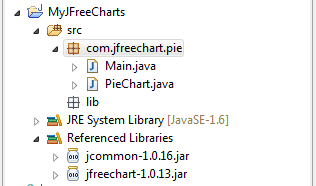
Create a project structure as shown below,


Create a PieChart.java class having pie chart implementation. As shown below,


PieChart.java


package com.jfreechart.amolfasale;
import javax.swing.JFrame;
import org.jfree.chart.ChartFactory;
import org.jfree.chart.ChartPanel;
import org.jfree.chart.JFreeChart;
import org.jfree.chart.plot.PiePlot3D;
import org.jfree.data.general.DefaultPieDataset;
import org.jfree.data.general.PieDataset;
import org.jfree.util.Rotation;

@SuppressWarnings("serial")

public class PieChart extends JFrame {
    public PieChart(String applicationTitle, String chartTitle) {
        super(applicationTitle);
        // This will create the dataset
        PieDataset dataset = createDataset();

        // based on the dataset we create the chart
        JFreeChart chart = createChart(dataset, chartTitle);

        // we put the chart into a panel
        ChartPanel chartPanel = new ChartPanel(chart);

        // default size
        chartPanel.setPreferredSize(new java.awt.Dimension(500, 270));

        // add it to our application
        setContentPane(chartPanel);
    }

    //Here is the dataset creation which is used for the information which we want to show in piechart.
    private  PieDataset createDataset() {

        DefaultPieDataset result = new DefaultPieDataset();

        result.setValue("INDIA", 29);

        result.setValue("UK", 20);

        result.setValue("USA", 51);

        return result;
    }

    private JFreeChart createChart(PieDataset dataset, String title) {

        //Here we are creating the 3D pie chart with dataset(created above) and with legend.
        JFreeChart chart = ChartFactory.createPieChart3D(title,  // chart title
                dataset,                // data
                true,                   // include legend
                true,
                false);

        PiePlot3D plot = (PiePlot3D) chart.getPlot();
        plot.setStartAngle(290);
        plot.setDirection(Rotation.CLOCKWISE);
        plot.setForegroundAlpha(0.5f);
        return chart;
    }
}
Then create Main class which have the call to createing piechart method. As shown below, 
Main.java
package com.jfreechart.amolfasale;
public class Main {
public static void main(String[] args) {
    PieChart demo = new PieChart("Comparison", "Which operating system are you using?");
    demo.pack();
    demo.setVisible(true);
    }
} 

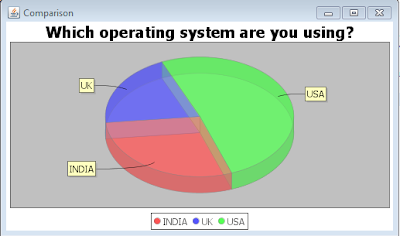
Run the Main class as a JAVA application, you will get a output as JFrame showing the piecharts.

Output:

Working with Spring 3.

Dear All,
Staring with Spring 3, The Spring API needs to included in the project, please download Spring 3 Framework libraries and add to the referenced libraries of project.


Create JAVA project with following structure,


In Spring, spring configuration file acts as a controller of the application,
here we created the "Spring3HelloWorld.xml" as a spring controller, which include the bean tag followed by root tag which might be contains multiple bean references, for example now we are including only tow beans as a refernce,
Here the same bean id associated with the bean class.

Spring3HelloWorld.xml
 
Now we created two beans,
Spring3HelloWorld.java
package spring.com;

public class Spring3HelloWorld {
   
    public void sayHello(){
        System.out.println("Hello Spring 3.0");
    }
}

and

Spring3GoingToHell.java
package spring.com;

public class Spring3GoingToHell {
    public void sayHello1(){
        System.out.println("Going To Hell");
    }
}

Now we have the Main class calling the beans through spring framework using application context,

Spring3HelloWorldTest.java
package spring.com;

import org.springframework.beans.factory.xml.XmlBeanFactory;
import org.springframework.context.ApplicationContext;
import org.springframework.context.support.ClassPathXmlApplicationContext;
import org.springframework.context.support.GenericApplicationContext;
import org.springframework.context.support.GenericXmlApplicationContext;
import org.springframework.core.io.ClassPathResource;

public class Spring3HelloWorldTest {

    public static void main(String[] args) {

        //way 1
        XmlBeanFactory beanFactory = new XmlBeanFactory(new ClassPathResource("Spring3HelloWorld.xml"));

        //way 2
        ApplicationContext context = new ClassPathXmlApplicationContext("Spring3HelloWorld.xml");

        //way 3
        ApplicationContext context1 = new GenericXmlApplicationContext("Spring3HelloWorld.xml");


        Spring3HelloWorld myBean0 = (Spring3HelloWorld)beanFactory.getBean("Spring3HelloWorldBean");
        myBean0.sayHello();
       
        Spring3GoingToHell myBean1 = (Spring3GoingToHell) context.getBean("Spring3GoingToHellBean");
        myBean1.sayHello1();
       
        Spring3HelloWorld myBean2 = (Spring3HelloWorld) context1.getBean("Spring3HelloWorldBean");
        myBean2.sayHello();
  
    }
}     

Here are three ways to get a bean object from the Spring configuration xml file, Just get the object of bean from application context and then invoke the bean related operations.

For more details or any queries please mail me at
amol.phasale@gmail.com 

Thank you.

Sunday, March 3, 2013

MapReduce : writting a Simple wordcount program.

Below is the simple program to understand workingof MapReduce.

package com.hadoop.mapreduce;

import java.io.IOException;
import java.util.*;

import org.apache.hadoop.fs.Path;
import org.apache.hadoop.conf.*;
import org.apache.hadoop.io.*;
import org.apache.hadoop.mapreduce.*;
import org.apache.hadoop.mapreduce.lib.input.FileInputFormat;
import org.apache.hadoop.mapreduce.lib.input.TextInputFormat;
import org.apache.hadoop.mapreduce.lib.output.FileOutputFormat;
import org.apache.hadoop.mapreduce.lib.output.TextOutputFormat;

public class WordCount {
    // Mapper inner class
    public static class Map extends Mapper<LongWritable, Text, Text, IntWritable> {
        private final static IntWritable one = new IntWritable(1);
        private Text word = new Text();

        public void map(LongWritable key, Text value, Context context) throws IOException, InterruptedException {
            //Proccessing each line from input file
            String line = value.toString();
           //separating each word and putting into the map. 
            StringTokenizer tokenizer = new StringTokenizer(line);
            while (tokenizer.hasMoreTokens()) {
                word.set(tokenizer.nextToken());
                //key as a word and value as a count
                context.write(word, one);
            }
        }
    }
   // Reducer inner class
    public static class Reduce extends Reducer<Text, IntWritable, Text, IntWritable> {

        public void reduce(Text key, Iterable<IntWritable> values, Context context)
        throws IOException, InterruptedException {
            int sum = 0;
            //summation of same words and counting their occurances 
            for (IntWritable val : values) {
                sum += val.get();
            }
            //writing output into the context
            context.write(key, new IntWritable(sum));
        }
    }

   //main class takes input file as a command line args
    public static void main(String[] args) throws Exception {
        Configuration conf = new Configuration();

        Job job = new Job(conf, "wordcount");

        job.setOutputKeyClass(Text.class);
        job.setOutputValueClass(IntWritable.class);

        job.setMapperClass(Map.class);
        job.setReducerClass(Reduce.class);

        job.setInputFormatClass(TextInputFormat.class);
        job.setOutputFormatClass(TextOutputFormat.class);

        FileInputFormat.addInputPath(job, new Path(args[0]));
        FileOutputFormat.setOutputPath(job, new Path(args[1]));

        job.waitForCompletion(true);
    }

}
Read more: http://thinkjava.boards.net/index.cgi?action=display&board=hadoop&thread=7&page=1#12#ixzz2MTlBvOwR

MapReduce : Programming component of Hadoop

MapReduce is one of the core components of hadoop framework, Data processing and manipulation is the key responsibility of MapReduce. It is key algorithm that the Hadoop MapReduce engine uses to distribute work around a cluster.

The Map
A map transform is provided to transform an input data row of key and value to an output key/value:
          map(key1,value) -> list<key2,value2>
That is, for an input it returns a list containing zero or more (key, value) pairs:

The output can be a different key from the input, output can have multiple entries with the same key

The Reduce
A reduce transform is provided to take all values for a specific key, and generate a new list of the reduced output.
         reduce(key2, list<value2>) -> list<value3>

The MapReduce Engine
The key aspect of the MapReduce algorithm is that if every Map and Reduce is independent of all other ongoing Maps and Reduces, then the operation can be run in parallel on different keys and lists of data. On a large cluster of machines, you can go one step further, and run the Map operations on servers where the data lives. Rather than copy the data over the network to the program, you push out the program to the machines. The output list can then be saved to the distributed filesystem, and the reducers run to merge the results. Again, it may be possible to run these in parallel, each reducing different keys.

A distributed filesystem spreads multiple copies of the data across different machines. This not only offers reliability without the need for RAID-controlled disks, it offers multiple locations to run the mapping. If a machine with one copy of the data is busy or offline, another machine can be used.

A job scheduler (in Hadoop, the JobTracker), keeps track of which MR jobs are executing, schedules individual Maps, Reduces or intermediate merging operations to specific machines, monitors the success and failures of these individual Tasks, and works to complete the entire batch job.

The filesystem and Job scheduler can somehow be accessed by the people and programs that wish to read and write data, and to submit and monitor MR jobs.

Apache Hadoop is such a MapReduce engine. It provides its own distributed filesystem and runs [HadoopMapReduce] jobs on servers near the data stored on the filesystem -or any other supported filesystem, of which there is more than one.

Limitations
1. For maximum parallelism, you need the Maps and Reduces to be stateless, to not depend on any data generated in the same MapReduce job. You cannot control the order in which the maps run, or the reductions.

2. It is very inefficient if you are repeating similar searches again and again. A database with an index will always be faster than running an MR job over unindexed data. However, if that index needs to be regenerated whenever data is added, and data is being added continually, MR jobs may have an edge. That inefficiency can be measured in both CPU time and power consumed.

3. In the Hadoop implementation Reduce operations do not take place until all the Maps are complete (or have failed and been skipped). As a result, you do not get any data back until the entire mapping has finished.

4. There is a general assumption that the output of the reduce is smaller than the input to the Map. That is, you are taking a large datasource and generating smaller final values.

Will MapReduce/Hadoop solve my problems?If you can rewrite your algorithms as Maps and Reduces, then yes. If not, then no. It is not a silver bullet to all the problems of scale, just a good technique to work on large sets of data when you can work on small pieces of that dataset in parallel.

Saturday, March 2, 2013

Big data : The Future of innovation.


Services like social networks, web analytics, and intelligent e-commerce often need to manage data at a scale too big for a traditional database. Complexity increases with scope, scale and demand, and handling big data is not as simple as just doubling or increasing down on your RDBMS or rolling out some trendy new technology. Fortunately, scalability and simplicity are not mutually exclusive—you just need to take a different approach. Big data systems use many machines working in parallel to store and process data, which introduces fundamental challenges unfamiliar to most developers.

Big Data tells you to build these systems using an architecture that takes advantage of clustered hardware along with new tools designed specifically to capture and analyze web-scale data(for example Apache Hadoop). It describes a scalable, easy to understand approach to big data systems that can be built and run by a small team.

for more details :
http://www.mckinsey.com/insights/mgi/research/technology_and_innovation/big_data_the_next_frontier_for_innovation

Followers